👋 Hi, I'm Chris DN (ex-Sequoia, VC, DJ)
Keep Your Communities Connected
I'm a 250k+ community builder in San Francisco.
Use this tool to quickly lower the friction of connecting people.
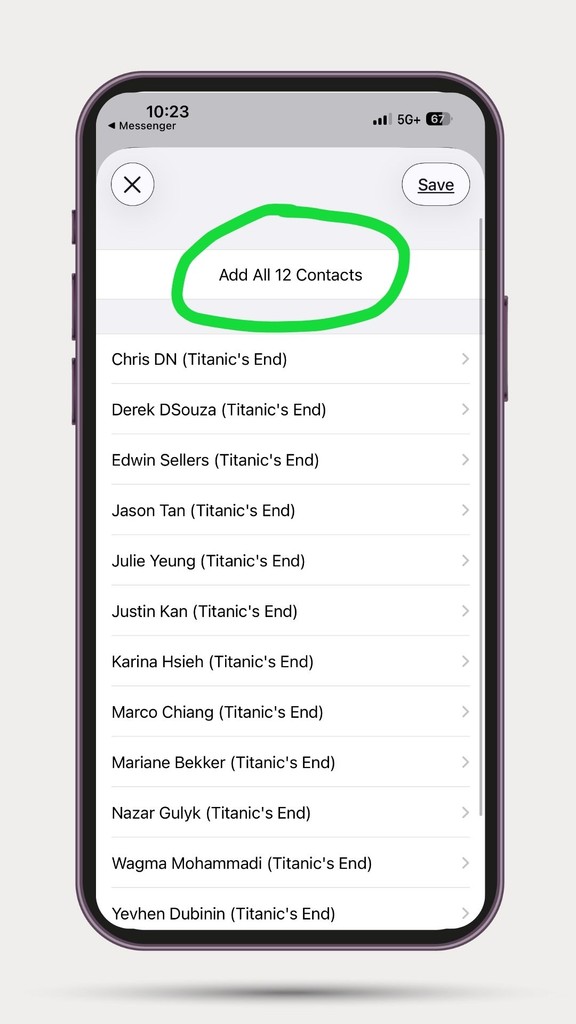
Simply paste your contact list, share the outputted file, and everyone adds each other in one tap.
Paste link
›
Map columns
›
Preview
›
Download VCF
1 Paste your Google Sheet link (with contact list)
Copy these column headers into row 1 of your Google Sheet:
Click Copy Headers → paste into Google Sheets row 1 → each header goes into its own column. First Name and Last Name are required.
Then: click Share → under General access select Anyone with the link → set role to Viewer → copy the link above.
2 Match your columns
3 Preview
Your contact file is ready
Share the VCF file or download it to add contacts.
How to share the contact file
- AirDrop & iMessage: Works perfectly — recipients tap the file and instantly get the "Import X Contacts?" prompt
- WhatsApp: Share as a Document (not a photo). Recipients download it, then open from their Files app
- Email & Slack: Attach the VCF file — works great for cross-platform sharing
Opening the file
- iPhone: Tap the file → iOS shows "Import X Contacts?" → tap Import
- Android: Open contacts.vcf from Downloads folder
- Desktop: Double-click to import into Contacts, Outlook, or any address book